
Unlocking Your iPhone’s Potential: How to Clear Facebook Cache for Enhanced Performance
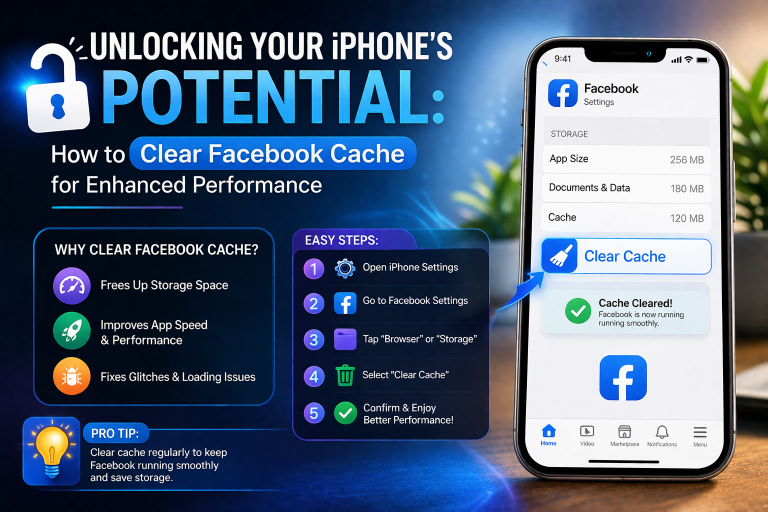
In our increasingly connected digital lives, social media applications like Facebook are central to communication and information. However, over time, these apps accumulate significant amounts of cached data, potentially impacting your device’s performance and privacy. This guide will walk you through the essential steps on how to clear Facebook cache on iPhone, iPad, and Android, ensuring your devices run smoothly and your digital footprint remains managed.
Understanding Facebook Cache and Its Impact
Cache data is temporary information stored by applications to expedite loading and improve user experience. For Facebook, this includes images, videos, and content you’ve viewed. The app retrieves content from the cache rather than redownloading, leading to quicker access.
While designed for efficiency, an overgrown cache can lead to several drawbacks. It consumes substantial device storage, particularly on iPhones and iPads. This can result in slower app performance, longer loading times, and system sluggishness. Furthermore, accumulated cache data represents a collection of your browsing history within the app, raising privacy considerations.
Actively managing and clearing this cached data is a proactive step toward maintaining optimal device health and ensuring a more private experience within the Facebook application. It frees up valuable storage space and improves responsiveness.
Clearing Facebook Cache on iPhone and iPad
For Apple users, managing the Facebook cache involves a few distinct methods, each offering varying degrees of cache removal. These approaches allow users to maintain device performance and manage privacy effectively.
Method 1: Clearing Within the Facebook App (Browser Cache)
Facebook’s in-app browser accumulates cache from websites visited through the app. Clearing this data specifically targets your browsing history within Facebook, contributing to better privacy management for your in-app web activities.
- Open Facebook, go to ‘Menu’ (three lines).
- Tap ‘Settings & Privacy,’ then ‘Settings.’
- Under ‘Permissions,’ select ‘Browser.’
- Tap ‘Clear’ next to ‘Your browsing data.’
Method 2: Offloading the Facebook App (iOS Storage Management)
Offloading is an iOS feature that removes the app but preserves its documents and data. This efficiently frees up storage. Reinstalling the app downloads a fresh version while restoring your personal data, effectively clearing most accumulated cache.
- Go to ‘Settings’ > ‘General’ > ‘iPhone Storage’ (or ‘iPad Storage’).
- Find ‘Facebook’ and tap ‘Offload App.’
- Confirm, then tap ‘Reinstall App’ to redownload a clean version.
Method 3: Deleting and Reinstalling the Facebook App (Comprehensive Cache Clear)
For the most thorough, clear Facebook cache on iPhone or iPad, completely deleting and then reinstalling the app is the most effective. This action removes all associated data, including the entire cache, offering a fresh start and reclaiming significant storage space. This method is particularly recommended for addressing persistent performance issues.
- From your Home Screen, press and hold the Facebook app icon until it jiggles.
- Tap the ‘-‘ icon and confirm ‘Delete App.’
- Open the App Store, search for ‘Facebook,’ and redownload. You will need to log back in.
Regularly employing these methods helps Apple devices remain optimized, freeing up valuable storage space for new photos, videos, or other essential applications without compromising device speed. This proactive approach to managing your digital footprint ensures a smoother, more efficient user experience.
Clearing Facebook Cache on Android Devices
While primarily focusing on Apple devices, Android users also benefit from managing their Facebook cache. The process on Android is unified and directly accessible through system settings, making it a quick task to free up storage and maintain app performance.
To clear the Facebook cache on an Android device:
- Open ‘Settings,’ then tap ‘Apps’ (or ‘Apps & notifications’).
- Find and tap ‘Facebook’ in the list.
- Tap ‘Storage’ (or ‘Storage & cache’).
- Tap ‘Clear Cache’ to remove temporary files. Tapping ‘Clear Data’ will remove all app data, including cache, requiring re-login.
This direct approach on Android offers a simple way to maintain app performance and storage efficiency, mirroring the benefits for Apple users who clear their Facebook cache.
Frequently Asked Questions
What is Facebook cache, and why should I clear it?
Facebook cache consists of temporary files like images and videos stored by the app to load content faster. Clearing it helps free up storage space, improve app performance, and enhance privacy by removing stored browsing data.
Will clearing Facebook cache log me out?
Using the in-app browser clear option or ‘Clear Cache’ on Android typically will not log you out. However, ‘Offloading’ on iOS or ‘Clear Data’ on Android, and especially deleting and reinstalling the app, will require you to log back into your Facebook account.
How often should I clear my Facebook cache on iPhone?
The frequency depends on your usage. For heavy users, clearing Facebook cache on iPhone every few weeks or once a month is a good practice. For lighter users, every few months might suffice to maintain optimal performance.
Does clearing the cache delete my photos or posts on Facebook?
No, clearing the Facebook cache only removes temporary files stored on your device. It does not delete any of your photos, posts, messages, or other permanent data stored on Facebook’s servers. Your account content remains safe.
Can clearing the Facebook cache improve my iPhone’s battery life?
While not a direct battery-saving measure, an overloaded cache can contribute to an app working harder, potentially using more power. Clearing the Facebook cache can lead to smoother app operation, which might indirectly contribute to marginal battery efficiency improvements by reducing the app’s overall resource consumption.
Verdict
Managing accumulated data from applications like Facebook is a vital aspect of modern device maintenance. Regularly clearing your Facebook cache across iPhone, iPad, and Android devices offers tangible benefits, including improved application responsiveness, enhanced device storage, and a more controlled digital footprint. This proactive step helps users maintain peak performance for their mobile devices, ensuring a smoother and more private experience with this popular social platform.
- Upgrade Your Apple Watch Ultra with a Practical Titanium Band
- Smart Home Upgrade: Anker eufy E340 Video Doorbell for Apple Users
- Practical Display: Amazon Ember Artline TV Hits a Smart Early Low Price
- Nothing Ear (Open) Blue Hits $79: A Practical Listen for Apple Users
- Nothing Ear (3): Practical ANC Buds for Your Everyday Apple Setup
"Note:We may receive a affiliate commission when you purchase products mentioned on our website."