

Acer Ergonomic Mouse Wireless: A Comfort-Focused Upgrade for Apple Users
In the evolving landscape of personal computing, ergonomic solutions are becoming increasingly important for user comfort and productivity. For Apple users, integrating peripherals that enhance their daily workflow while prioritizing health is a key consideration. The Acer Ergonomic Mouse Wireless enters this space, offering a design focused on comfort and adaptable functionality. This article explores its features and how such a device fits into a modern computing environment, particularly for those accustomed to Apple’s ecosystem.
The Importance of Ergonomics in a Digital World
Modern work and leisure often involve extended periods at a computer, making the choice of peripherals a significant factor in long-term health. Traditional mice can sometimes contribute to wrist strain or discomfort over time, leading to a growing interest in ergonomic alternatives designed to promote a more natural hand and wrist posture.
A vertical mouse, for instance, reorients the hand into a handshake-like position, which can alleviate pressure on the wrist and forearm. This design philosophy aims to reduce the risk of repetitive strain injuries. As more users spend hours interacting with their devices, adopting ergonomically sound equipment is a proactive step towards maintaining comfort and well-being.

Design and Performance Considerations
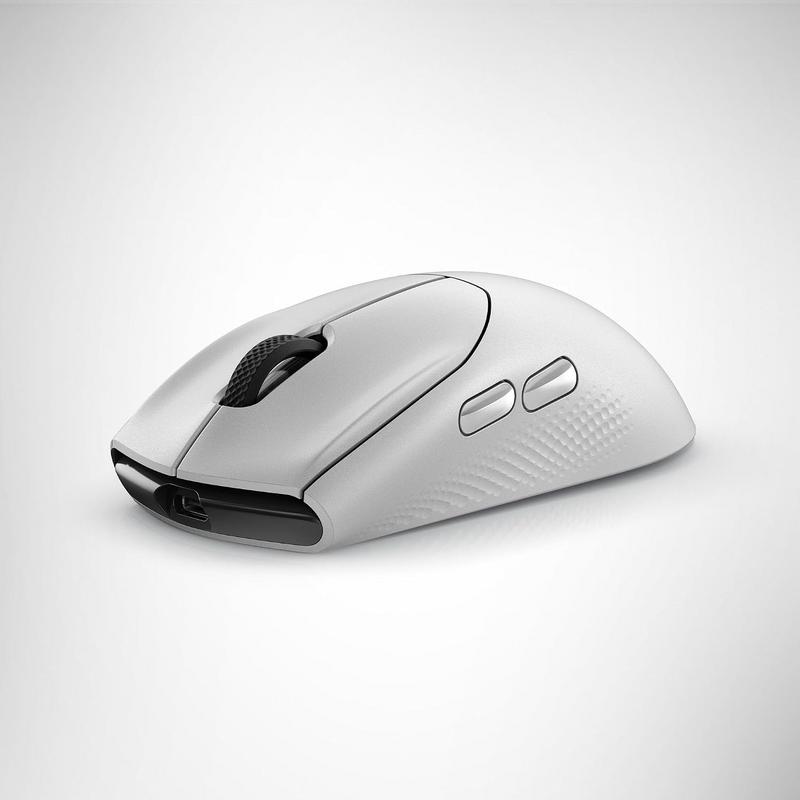
The Acer Ergonomic Mouse Wireless incorporates several features aimed at providing both comfort and precise control. Its vertical orientation is the primary ergonomic highlight, encouraging a neutral wrist alignment during use. This design choice is particularly relevant for those who spend significant time navigating digital interfaces.
Beyond its shape, the mouse offers adjustable DPI settings, allowing users to switch between 1000, 1200, and 1600 dots per inch. This flexibility is crucial for adapting to various tasks, from detailed graphic design work to general browsing. Adjusting the DPI can significantly impact precision and efficiency across different screen resolutions and user preferences.
Further enhancing its practicality, the device is rechargeable, eliminating the need for disposable batteries. This not only contributes to convenience but also aligns with an environmentally conscious approach. The inclusion of six buttons provides additional functionality, which can be useful for assigning shortcuts or specific commands, potentially streamlining workflows.
The real-world usefulness of such features becomes apparent in daily tasks, where subtle improvements in comfort and control lead to a more pleasant and productive experience. For Apple users who value intuitive interaction, an ergonomic mouse with adaptable settings offers a tangible upgrade to their computing setup.
The product is currently listed on Amazon.
You can find the detailed information here.
Seamless Integration into the Apple Ecosystem
For Apple users, integrating a new peripheral often involves considerations of compatibility and ease of setup. Wireless mice, including ergonomic models like the Acer Ergonomic Mouse Wireless, are generally designed for effortless connection with macOS devices via standard wireless protocols. This ensures quick integration into an existing workspace without complex configurations.
An ergonomic mouse, with its focus on user comfort and efficiency, can become a valuable extension of an Apple setup. This combination allows individuals to maintain their preferred operating system while benefiting from improved physical comfort during extended computer sessions.
Frequently Asked Questions
What is a vertical mouse and how does it help?
A vertical mouse reorients the user’s hand into a natural handshake position. This design aims to reduce wrist pronation and alleviate pressure on the carpal tunnel, potentially preventing strain and discomfort associated with traditional mouse usage.
How do adjustable DPI settings benefit users?
Adjustable DPI (dots per inch) settings, such as 1000/1200/1600, allow users to control the cursor’s sensitivity and speed. This flexibility is beneficial for tasks requiring precise movements, like graphic design, as well as for general navigation where quicker cursor travel is desired.
Is the Acer Ergonomic Mouse Wireless compatible with macOS?
Most wireless mice, including the Acer Ergonomic Mouse Wireless, are designed to be universally compatible with modern operating systems, including macOS. They typically connect via a USB receiver or Bluetooth, allowing for straightforward integration into Apple setups.
What are the advantages of a rechargeable ergonomic mouse?
A rechargeable ergonomic mouse offers convenience by eliminating the need to frequently replace disposable batteries. Users can simply plug in the mouse to recharge, ensuring continuous operation while also contributing to reduced waste.
Verdict
The Acer Ergonomic Mouse Wireless offers a compelling option for those seeking enhanced comfort and control. Its vertical design prioritizes ergonomic posture, while adjustable DPI settings provide versatile precision for various tasks. The rechargeable feature adds convenience and sustainability. For Apple users considering an input device upgrade, this ergonomic mouse presents a practical blend of features for extended, comfortable use.
You may also like
- Anker MagGo Power Bank: An Essential Portable Charger for iPhone Users
- UGREEN Nexode 240W Cable: A Smarter USB-C Upgrade for Apple Devices
- Logitech MX Anywhere 3S for Mac: A Portable Upgrade for Your Apple Workflow
- Top Tools to Remove iCloud Activation Lock on iPhone and iPad in 2026
- Twelve South PowerCord: A Powerful USB-C Charger for Apple Users
"Note:We may receive a affiliate commission when you purchase products mentioned on our website."