
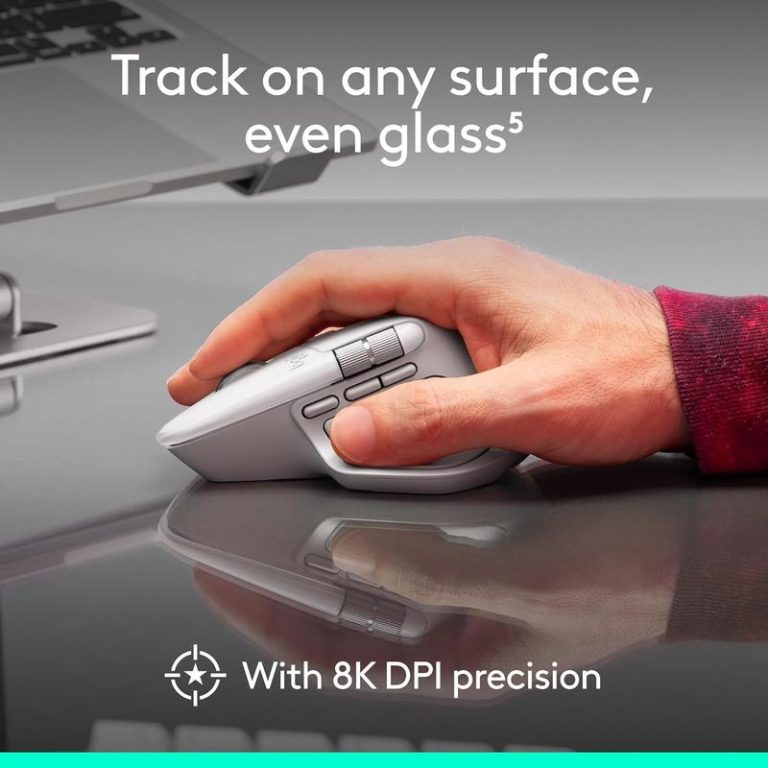
The Logitech MX Master series has long been a favorite among those seeking more precise control and comfort beyond Apple’s Magic Mouse. Now, with the haptics-enabled MX Master 4 seeing its lowest price of the year, it’s drawing significant attention from Mac, iPad, and even iPhone users looking to optimize their daily digital interactions. This isn’t just about a new peripheral; it’s about refining how we navigate our creative tasks and manage our workflows on Apple devices, promising a more tactile and intuitive experience.
Enhanced Control for Your Apple Workflow
What makes the MX Master 4 particularly compelling for the Apple ecosystem is its thoughtful approach to multi-device use and customizability. For anyone juggling a MacBook Pro at a desk and an iPad Pro on the go, a mouse that effortlessly switches between devices without reconnection hassles is incredibly convenient. Imagine transitioning from editing a document on your Mac to fine-tuning an illustration on your iPad, all with the same familiar precision tool. Its comfortable, ergonomic design also means less hand strain during long design sessions or coding sprints, making extended work periods feel more natural. Check detail for more on its capabilities.
“The right input device can profoundly impact daily productivity and comfort, especially for those deeply invested in the Apple ecosystem.”
Key Features
- Precise Haptic Feedback: Offers tactile confirmation for scrolling and button presses, enhancing user interaction.
- Multi-Device Flow: Seamlessly controls multiple Mac or iPad devices, streamlining workflow between machines.
- Ergonomic Design: Shaped for hand comfort, reducing fatigue during long periods of use at a desk or on the move.
- Fast USB-C Charging: Quick power-ups with the same cable used for most modern Apple devices, simplifying cable management.
- Customizable Buttons: Programmable for specific functions within macOS or iPadOS apps, tailored to individual needs.
Why Apple Users Are Paying Attention
Apple users often prioritize a clean, efficient workspace and devices that complement their existing setup. The MX Master 4 speaks directly to this with features that improve daily workflow. The ability to move a cursor between multiple Macs or even an iPad and Mac with a single mouse simplifies complex tasks, removing friction from multitasking. Charging convenience is another big draw; using a common USB-C cable for power means one less unique charger to carry, reducing cable clutter at home or in a travel bag. This contributes to better desk organization and more mindful battery management, as users can top up the mouse alongside their other Apple gear. Its portable design also makes it a sensible companion for those who work remotely or frequently shift their workspace.

User queries to this product
Is the Logitech MX Master 4 fully compatible with Mac and iPad?
Yes, the MX Master 4 is designed for full compatibility with macOS and iPadOS, offering customizable controls and multi-device functionality.
How fast does the MX Master 4 charge with USB-C?
While specific charging times can vary, its USB-C port allows for quick and convenient charging, often providing hours of use from a short charge.
Can I use the MX Master 4 with my iPhone?
With recent iOS versions supporting mouse input, you can technically connect it to an iPhone, but its primary design is optimized for Mac and iPad workflows.
Does the MX Master 4 help with desk cable management?
Yes, its wireless connectivity and USB-C charging mean fewer dedicated cables are needed, contributing to a cleaner and more organized desk setup.
This product has recently gained attention among Apple users looking for a cleaner and more flexible everyday setup.
Verdict
The Logitech MX Master 4 emerges as a compelling choice for Apple users seeking to elevate their computing experience beyond standard input devices. Its haptic feedback, multi-device support, and ergonomic design directly address common pain points in modern workflows, from reducing hand strain during intensive tasks to simplifying the juggle between a MacBook and an iPad. For creatives, developers, or anyone who values precision and efficiency, this mouse offers a practical upgrade that integrates smoothly into the Apple ecosystem, providing both tangible comfort and a smarter way to navigate their digital day, making it particularly suitable for those who demand more from their peripherals.
"Note:We may receive a affiliate commission when you purchase products mentioned on our website."